Rest
RestaurantsCafésBarsHotelsPizzerias

Table bookings 24/7, no phone calls

Guests book 24/7 via the QR menu or a link. Calendar by table, auto-confirmations and reminders.

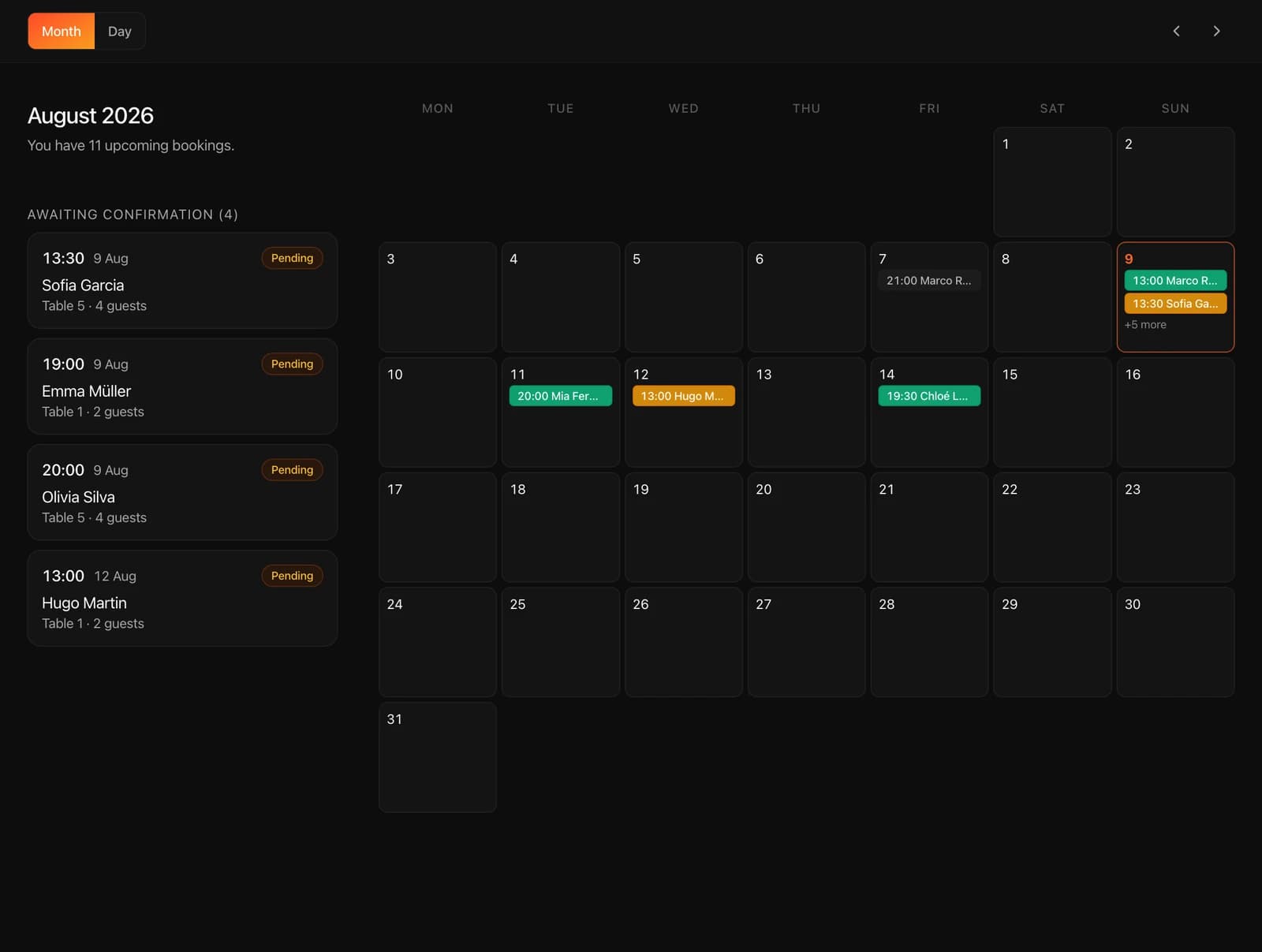
Tablet with a reservation calendar: month view and a list of bookings awaiting confirmation

Guests book themselves

Date, time and party size — from the QR menu or a direct link, at any time of day. The system shows only available slots.

  • Booking 24/7

    Guests book at night or on the weekend — no calls, no waiting for a reply

  • A table matched to party size

    The system picks a suitable table by capacity on its own

  • A minimal form

    Name, phone and party size — the form takes half a minute

A calendar by day and table

All bookings in one calendar: see what's free, what's confirmed and who's coming.

  • Day, week, month

    Switch views and plan seating in advance

  • Breakdown by table

    Who, when and for how many guests — for every table

  • Manage from your phone

    Reschedule, cancel or confirm a booking — with one tap

Schedule and modes

Set the booking schedule per day of the week, the slot duration and the confirmation mode.

  • Per-day schedule

    Separate hours for each day of the week, including a break between lunch and dinner

  • Slot duration

    Set the booking interval to fit your venue's format

  • Auto or manual

    Confirm each booking yourself or turn on auto-confirmation

Notifications without manual work

The system keeps the guest and your team informed — email and the reservation screen update instantly.

  • Email to the guest

    A booking confirmation is sent by email automatically

  • Notification to the restaurant

    Owners get an email about every new booking

  • A reservation screen at the entrance

    The host tablet shows new bookings in real time

Launch table reservations in 5 minutes.

Connect the calendar, add tables with photos and seating capacity — guests start booking the same day.

Frequently asked questions

What restaurateurs ask about table reservations in IQ Rest. If your question isn't listed — message us on WhatsApp.

Message us on WhatsApp

Can I choose the days and times when booking is available?

Yes. The admin panel lets you set a schedule per day of the week: booking hours and a break between lunch and dinner. You can also temporarily switch reservations off entirely — guests will see that online booking is unavailable.

Can I upload a photo of each table?

Yes. Every table has a photo, a capacity and a zone (terrace, by the window, bar). Guests see exactly which table they're reserving and make an informed choice.

Can I limit the number of guests per table?

Yes. Every table has a set capacity — the system offers guests only suitable tables and blocks a two-seater from being booked by a party of six.

How hard is it to set up reservations?

Three steps: add tables with photos and capacity, enable booking mode in settings, and share the link or QR code. Launch takes 5–10 minutes.

Can I set automatic or manual booking confirmation?

Yes, the mode is chosen in settings. With automatic confirmation the guest is confirmed right after submitting the form. With manual, the request appears in the panel as "pending confirmation" — a manager confirms or declines it. Manual mode is handy when tables are limited.

Do you charge a fee per booking?

There are no fees: reservations are included in the subscription — no percentage from guests, no per-slot charges, no middlemen. A fixed payment and unlimited bookings.

Reservations in 10 minutes. 14 days of full access.

No card needed, cancel anytime. 500+ restaurants take the load off their front desk with us. All you need is an email.